
From grape to glass: designing a wine market app
How do you approach designing an app for a wine e-commerce site?
It begins with extensive research on users and competitors, followed by an accurate, iterative UX design process comprising prototyping, development, and testing.
This process relies heavily on understanding the target audience and the market landscape.
But in my scenario, I considered XtraWine, a wine e-commerce platform, with limited information about its target audience -a common challenge for designers, let’s say it. How does one make informed decisions and create an optimal app in such circumstances?
The first step involves conducting a comparative analysis of leading apps in the industry, such as Vivino and Delectable. By studying user preferences, strengths, weaknesses, and untapped potential, we can design an app tailored to the needs of wine enthusiasts who frequent XtraWine.
These insights inform the thoughtful decision-making process required to deliver a superior user experience. Here are my reflections on navigating this design journey.
The competitive scenario
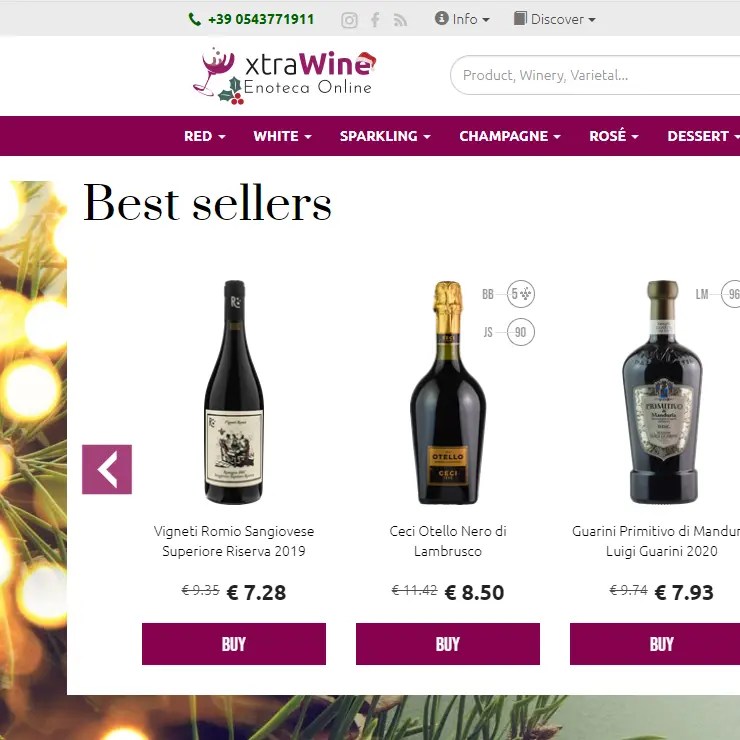
Xtrawine is an e-commerce platform specialising in Italian wines.
Customers can choose from an extensive collection of 10,000 labels, featuring a diverse range of Italian and international wines and spirits. Additionally, they can explore detailed ratings for each wine, consult information sheets, discover expert pairing recommendations, and enjoy exclusive access to special offers.
Xtrawine has won many industry awards, but it lacks its own app.
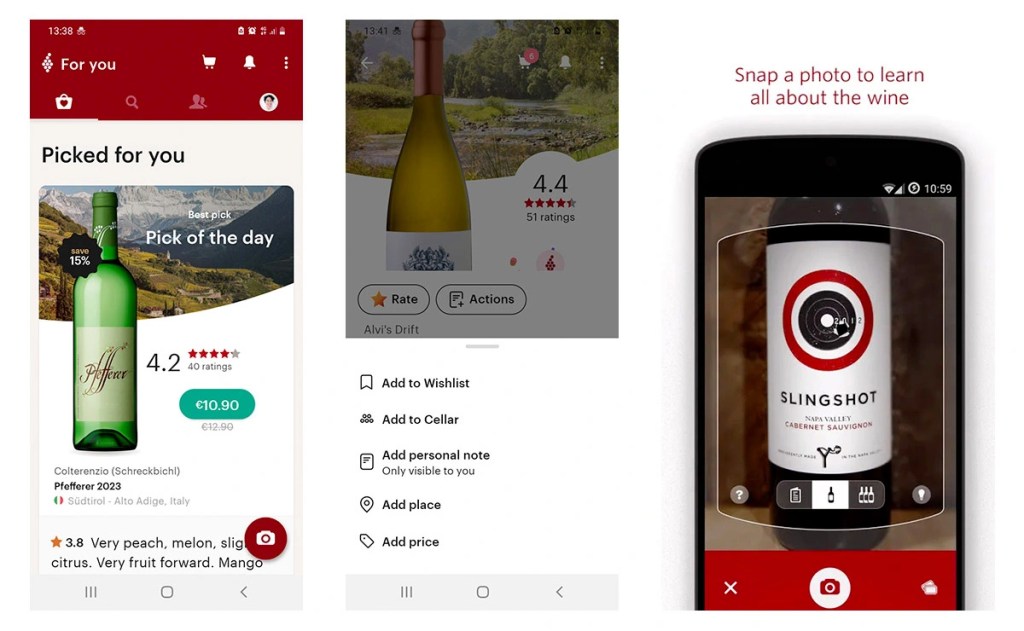
Vivino, the most downloaded wine selection and purchasing app (Google Play Store, 2023), stands out for its user-friendly interface, design, and accessibility for both wine enthusiasts and novices (Patel, 2023). Providing an excellent browsing experience, Vivino allows users to explore wines based on types, countries, regions, grape varieties, styles, pairings, retailers, and various search filters.
While concise, the product sheets are remarkably detailed, featuring a clean and elegant design. Beyond providing essential information like label, cellar, origin, grape variety, rating, reviews, retailer, price, and estimated delivery date, these sheets delve into the taste characteristics of the wine. They encompass insights from user reviews on aspects such as light/bold, dry/sweet, soft/acidic, and fruity/oaky/earthy profiles.
There are abundant opportunities for interaction, including adding wines to your wishlist, saving bottles in your virtual cellar, and attaching personal notes. For on-the-go use, you can even scan a restaurant’s wine list text if you’re unsure, saving a wine for future reference and including details like price and where you enjoyed it (Elliott and Watsky, 2023).
The app leverages touch-based technology to optimise user inputs, incorporating features such as a slider for rating assignments. This ensures a pleasant and varied user experience.
The phone and camera functionalities enable users to share images within the community, and scan wine labels for their virtual cellar, a standout feature of Vivino.
Another customisation option is creating a “taste profile” based on assigned ratings, leveraging user-generated data for personalised recommendations (Mccafferty, 2023).
Users can easily share content with those outside the app and recommend Vivino to friends. For more experienced users, there’s also a paid Premium version with additional features.
Talking about weak points, users have expressed dissatisfaction with the frequent failure of scanned labels to be recognized, leading to the manual entry of details (Bryan, 2021), as reported in recent reviews on Google Play too.
Furthermore, for some wine experts, the food pairing section is overly simplistic and lacks practical utility (Digeso, 2021).
Combining elements of a wine journal and an educational resource, Delectable enables users to navigate the world of wines with insights from top sommeliers and winemakers (Daniels, 2023). The platform offers a user-friendly and visually appealing interface, maintaining a fresh and clean design.
In contrast to Vivino, Delectable positions itself more as a guide to mindful wine consumption. It features a robust section of editorial content and detailed wine profiles, complemented by comments and reviews from both novice and experienced enthusiasts. While it allows users to compare prices from wine makers and retailers and facilitates purchases, the app is evidently less focused on establishing itself as a marketplace and leans more towards being a wine advisory platform.
The “Featured” section, especially the blogs, stands out for hosting compelling content, featuring noteworthy reads from the “Tasting Notes: Weekly Roundup”. In this segment, the staff curates their favorite consumer tasting notes and photos of the week (Digeso, 2021).
Delectable also has a greater social vocation, enabling users to share tasting notes, ratings, and details about their drinking experience, not only within the app community but also across their Facebook, Twitter, and Instagram profiles.
Concerning user-generated content, Delectable also allows users to add images related to the wines they’ve tasted or purchased. However, the interface is simpler and offers fewer ways for users to input information. Additionally, unlike other apps focused solely on wines, Delectable includes beers and spirits, expanding its potential audience (Patel, 2023).
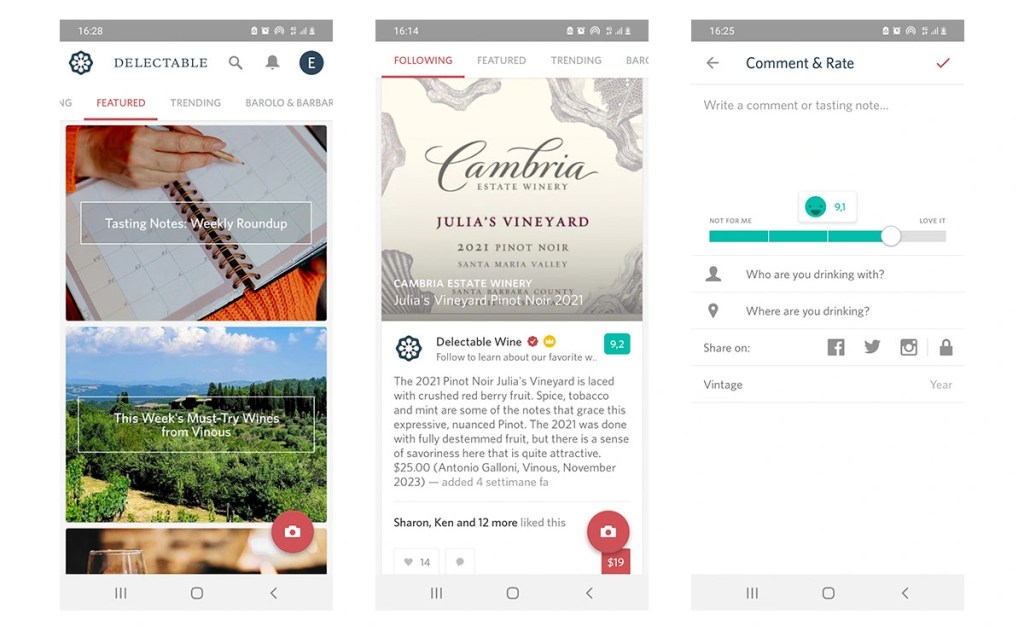
In terms of drawbacks, Delectable lacks the option to hide your posts and keep them private, allowing anyone who follows you to see your wine notes. Additionally, the app is missing a feature for creating a virtual cellar, a feature highly valued by users, as evidenced by the success of Vivino (Digeso, 2021).
It’s worth noting that none of the examined apps takes advantage of the possibilities offered by location-based and proximity-based marketing, as emphasized by an anonymous user comment on the Google Play Store: “It would be great if there will be also a map with all the wineries in the nearest area” (Google Play Store, 2019). While the comment is a few years old, it remains an opportunity that has yet to be explored by both Vivino and Delectable.
XtraWine app: 3 main functions
For XtraWine, I designed an app with 3 main functions:
- Search, compare & buy: users can conduct searches, filter results, explore wine profiles, read and add reviews, and place online orders with secure payments;
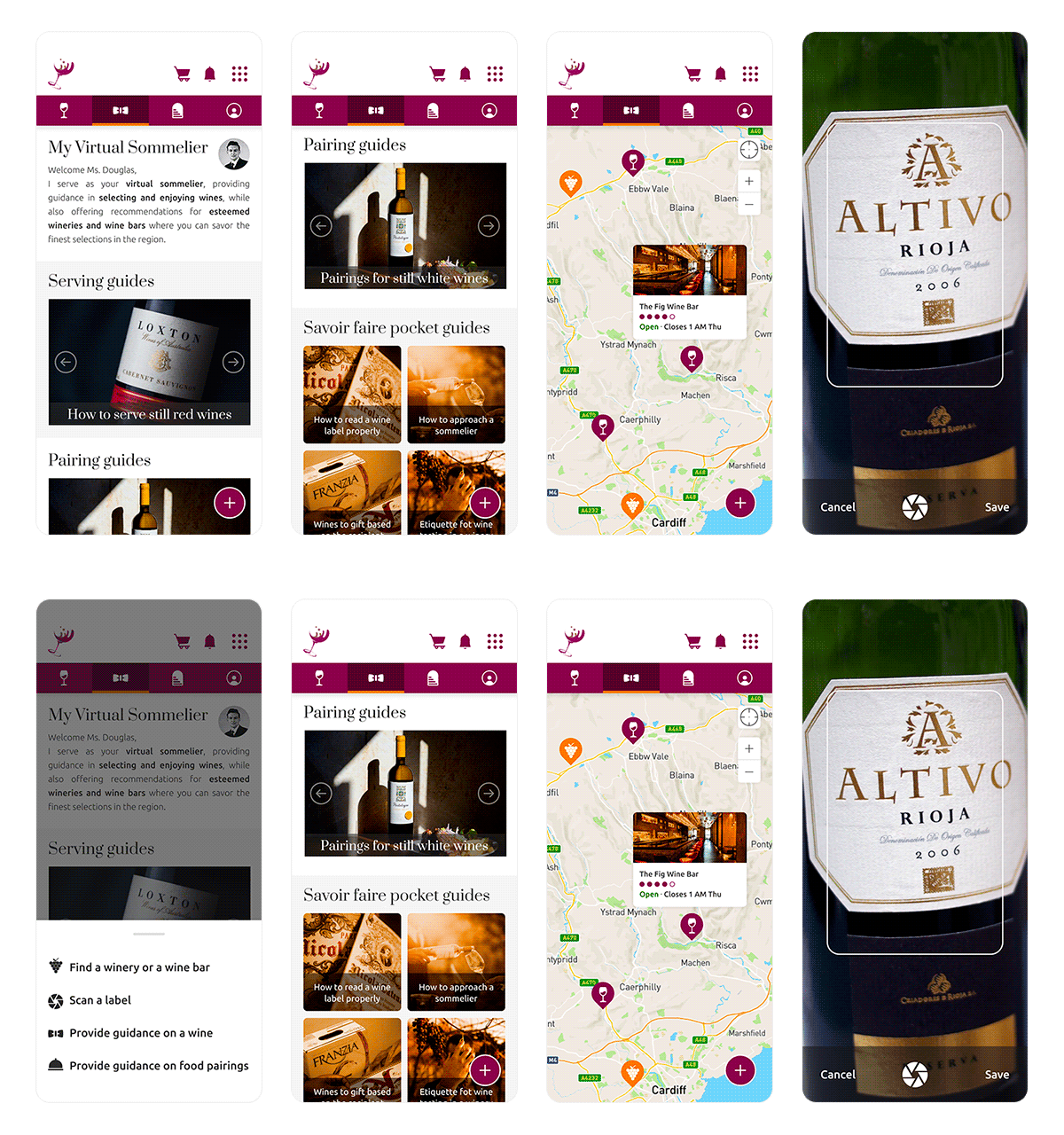
- My Virtual Sommelier: a virtual assistant that suggests ideal pairings for meals and recommends the best wine shops and cellars within a selected geographic radius;
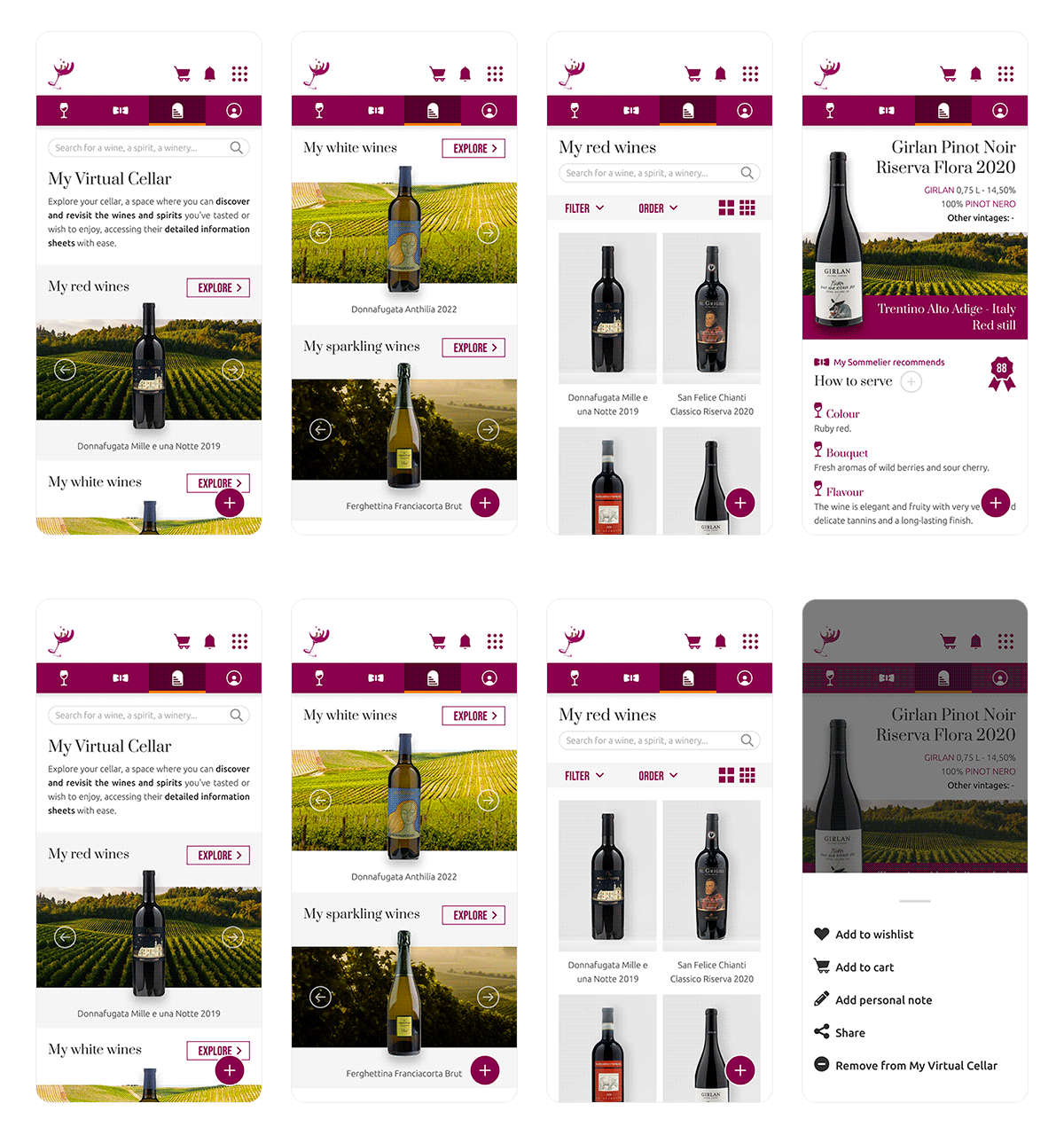
- My Virtual Cellar: users can create their virtual cellar by scanning wine labels.
Let’s say it one more time: while these are just speculative ideas, it’s crucial to emphasize that incorporating these functions should only follow in-depth user research conducted on XtraWine’s customers and prospects.
This approach ensures alignment with their specific needs, objectives, usage context, behavior, and mental models for an optimal user experience.
That said, let’s explore the 3 main functions.
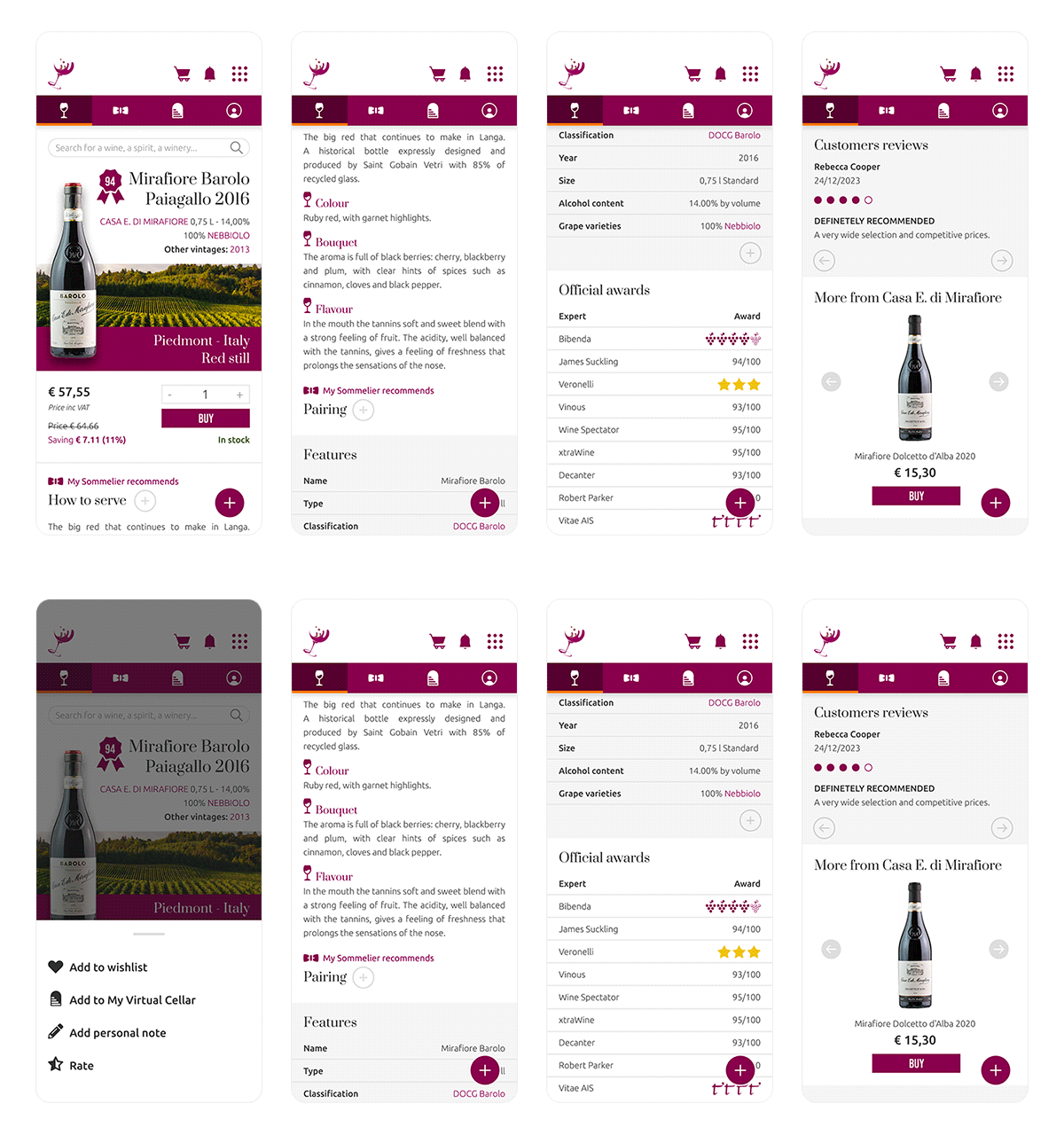
The “Search, compare & buy” feature incorporates a robust search engine, tapping into the extensive XtraWine database of 10,000 labels. Users can filter wines by various criteria such as types, countries, regions, grape varieties, styles, vintage, price range, pairings, and active promotions. Product sheets leverage the rich information from the site’s “Features” section. Users can rate wines, leave comments, and add personal notes, choosing to share or keep them private. Additionally, the feature facilitates secure online purchases with available payment methods, displaying the estimated delivery date.
“My Virtual Sommelier” provides additional insights on displayed wines. It offers suggestions to guide users toward optimal consumption, including details such as the ideal serving temperature, recommended decanting time, longevity, and suitable pairings. The app’s integrated label scanning and AI-driven virtual sommelier extend these details to wines consumed outside the home. With user consent, the virtual sommelier can also recommend the best wine shops and cellars within a specified geographical radius, leveraging untapped proximity-based marketing opportunities not explored by Vivino and Delectable.
This feature addresses the demand for guidance in selecting wines, a need underscored by the popularity of apps such as Delectable.
Lastly, the “My Virtual Cellar” feature, inspired by a similar function in Vivino, empowers users to build their personal wine collection by scanning and saving wine labels. Accessing their cellar, users can review information sheets for each saved wine, whether present in the Xtrawine database or added manually.
The cellar can be shared with the XtraWine community, either in its entirety or selectively for specific labels or categories, or kept private based on user preferences. This section includes a search engine for easy navigation within the collection, utilising the same criteria as the “Search, compare & buy” function.
Originally published on Medium, February 15, 2024
REFERENCES
Fig. 1. (2023) XtraWine homepage [Web page]. XtraWine. Available at: https://www.xtrawine.com/en
[Accessed December 20, 2023]
Fig. 2 (2023) Some screens from the Vivino app [Screenshots]. Available at: https://play.google.com/store/apps/details?id=vivino.web.app&hl=en&gl=IN
[Accessed December 20, 2023]
Fig. 3. (2023) Some screens from the Delectable app [Screenshots]. Available at: https://play.google.com/store/apps/details?id=com.delectable.mobile&hl=en_IN
[Accessed December 20, 2023]
Fig. 4. A product card in the “Search, Compare & Buy” section (top-down scroll visible from left to right), featuring some product images from XtraWine website.
Available at: https://www.xtrawine.com/en
[Accessed December 27, 2023]
Fig. 5. “My Virtual Sommelier” section with home, map and label scanner, featuring some product images from XtraWine website and some context images from Unsplash.
Available at https://www.xtrawine.com/en and at https://unsplash.com/
[Accessed December 28, 2023]
Fig. 6. “My Virtual Cellar” section with home, “My red wines” category and a product card, featuring some product images from XtraWine website and some context images from Unsplash.
Available at https://www.xtrawine.com/en and at https://unsplash.com/
[Accessed December 29, 2023]
Bryan C. (2023). Wine apps you need to check out in 2024. Travelling corkscrew blog. Available at: https://travellingcorkscrew.com.au/blog/best-wine-apps/
[Accessed December 21, 2023]
Daniels S. E. (2023). The top wine apps to help pick your bottles. Wine Enthusiast. Available at: https://www.wineenthusiast.com/culture/wine/top-wine-apps/
[Accessed December 21, 2023]
Digeso J. (2021). The 3 best free wine apps for keeping your tasting notes in 2022. SommWine online wine courses. Available at: https://www.sommwine.com/the-3-best-wine-apps-for-tasting-notes-in-2021/
[Accessed December 21, 2023]
Elliott M. and Watsky D. (2023). Best wine apps to help you pick a perfect bottle. CNET. Available at: https://www.cnet.com/tech/mobile/best-free-wine-apps/
[Accessed December 22, 2023]
Google Play Store (2023). The Vivino app on the Google Play Store (see “About this app” section). [Web page]. Available at: https://play.google.com/store/apps/details?id=vivino.web.app&hl=en&gl=IN
[Accessed December 20, 2023]
Mccafferty H. (2023). 10 best wine apps for 2023. Fine Dining lovers. Available at: https://www.finedininglovers.com/article/best-wine-apps
[Accessed December 22, 2023]
Patel M. (2023). The 15 Best Wine Apps for 2024. Concetto Labs blog. Available at: https://www.concettolabs.com/blog/best-apps-for-wine-aficionados/
[Accessed December 22, 2023]
 Eva De Crescenzo